

Historically, creating a Google account provided users with access to a shared 15GB storage pool across Gmail, Drive, and Photos, which has been seen as generous compared to competitors like Apple.

Recently, Google revised its storage policy, now tying the standard 15GB of free storage to accounts verified through a phone number.
As a result, this policy introduces a key change. During account creation, you might see a notification saying they are allocated only 5GB of free storage instead of 15GB if you don’t verify your account with a phone number.
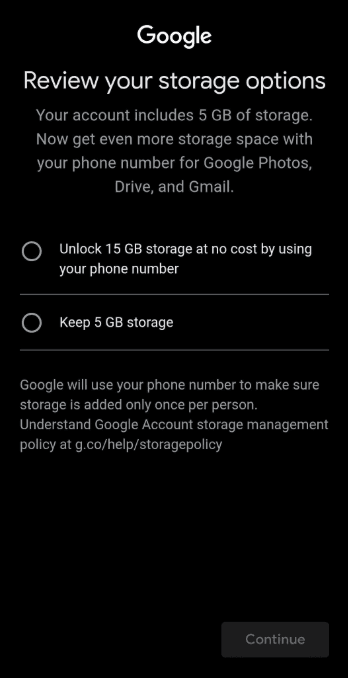
Your account includes 5 GB of storage. Now get even more storage space with your phone number for Google Photos, Drive, and Gmail.
Unlock 15 GB storage at no cost by using your phone number
Keep 5 GB storage
Google will use your phone number to make sure storage is added only once per person.
Understand Google Account storage management policy at g.co/help/storagepolicy
Keep accessing that storage management policy link, and you’ll find specific instructions on how to get an extra 10 GB for your account. Usually, the steps stay the same; you can add your phone number during registration or after creating your account.
Verify your phone number
To verify your number and unlock the additional storage, during sign-up, follow the on-screen instructions.
Or, you can:
- Go to Google One storage manager.
- Find the “Unlock 15 GB account storage.”
- Select Use phone number or Confirm phone.
- To confirm if your phone number was verified, in your Google Account, select Personal info and then Phone.
- Next to your phone number, you can find “Verified.” After you verify, your account receives the additional storage soon after.
Just a heads up: if you connect a phone number that’s already linked to another account, the new account will get the storage space, and the old one will lose it. Also, even if you add several phone numbers to your Google Account, you won’t get extra storage beyond the 15 GB you already have.
Google has mentioned that this process helps prevent both users and automated programs from abusing its system to gain extra storage. Additionally, they are dealing with rising costs and limited availability of memory and storage technologies, which are likely factors in their decision to implement these requirements.
At the time of posting, it seems that Google doesn’t clearly state that you need to link your phone number to get the 15GB of storage they offer, except during the initial setup of a new account. However, in most cases, you do need to verify your phone number when creating a new Google account. You’ll notice this requirement whether you’re using a computer or a mobile device.
Alternatives
If you prioritize using a free Google account for data storage because of its security, stability, and reputation, this new regulation could become a major obstacle. In reality, with only 5GB of storage shared across all services, you’ll probably no longer have enough space. Therefore, if Gmail isn’t mandatory, you might consider some of the alternatives we suggest below, which are also reputable companies with a long history you can trust.